
 Light Downloader Integration
What the extension does
- Automatically captures downloads you start in the browser (toggle it on or off from the extension popup).
- Right-click a link, image, audio, or video and choose Download with Light Downloader.
- Right-click a page and choose Download video from this page; the app grabs it with yt-dlp.
- Passes the site's cookies, referrer, and user-agent, so downloads that need your login session keep working.
The desktop app must be installed and running. The extension talks only to the Light Downloader app on your own computer (http://127.0.0.1). If the app is not running, your browser downloads normally and nothing is captured.
Install
- Install the Light Downloader desktop app and start it. It needs Windows 10/11 (64-bit) and the .NET 8 Desktop Runtime (x64).
- Add the extension to your browser:
The store listings are under review. Until they are published, you can install the extension manually:
Manual install: Chrome, Edge, and other Chromium browsers
- Download light-downloader-chrome.zip and extract it to a folder you will keep.
- Open
chrome://extensions(in Edge:edge://extensions). - Turn on Developer mode.
- Click Load unpacked and select the extracted folder (the one that contains
manifest.json).
Manual install: Firefox (temporary)
- Download light-downloader-firefox.zip.
- Open
about:debugging#/runtime/this-firefox. - Click Load Temporary Add-on… and select the downloaded ZIP file (or
manifest.jsonafter extracting it).
Firefox removes temporary add-ons when it restarts. For a permanent install, use the Firefox Add-ons listing once it is published.
How to use
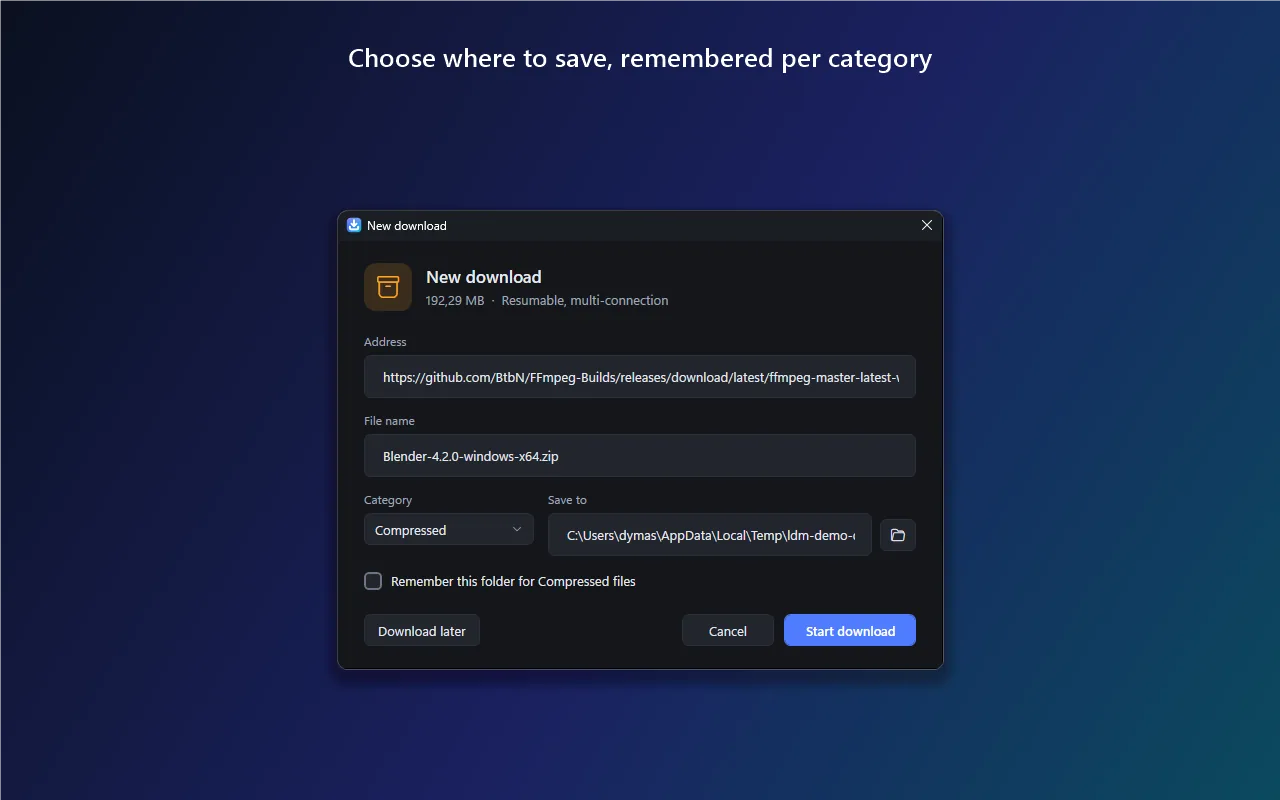
- Automatic capture: with the desktop app running, start a download as usual. The browser's own download is cancelled and the app takes over, asking where to save the file.
- Turn capture on or off: click the extension icon and use the switch in the popup.
- Right-click menu: on a link, image, audio, or video, choose Download with Light Downloader. On a page, choose Download video from this page.
Permissions and why they are needed
| Permission | Why it is needed |
|---|---|
downloads | To detect a download you start and cancel the browser's copy so the desktop app can take over. |
cookies | To read the originating site's cookies so the desktop app can fetch files that require your logged-in session (for example, files behind a login). |
contextMenus | To add the "Download with Light Downloader" and "Download video from this page" right-click items. |
storage | To remember one setting: whether automatic capture is on or off. |
Host access <all_urls> | Two reasons: (1) to read cookies for whatever site a captured download comes from; (2) to connect to the local desktop app at http://127.0.0.1. The extension does not read or modify page content, inject scripts, or track browsing. |
Remote code: none. The extension contains no remote or eval'd code.
Data handling: the URL, cookies, referrer, and user-agent are collected only for downloads you choose to capture, and are sent solely to your local Light Downloader app. They are not sold, not shared with third parties, not used for tracking, and not sent to any remote server. Full details are in the privacy policy.
Troubleshooting
Downloads are not captured
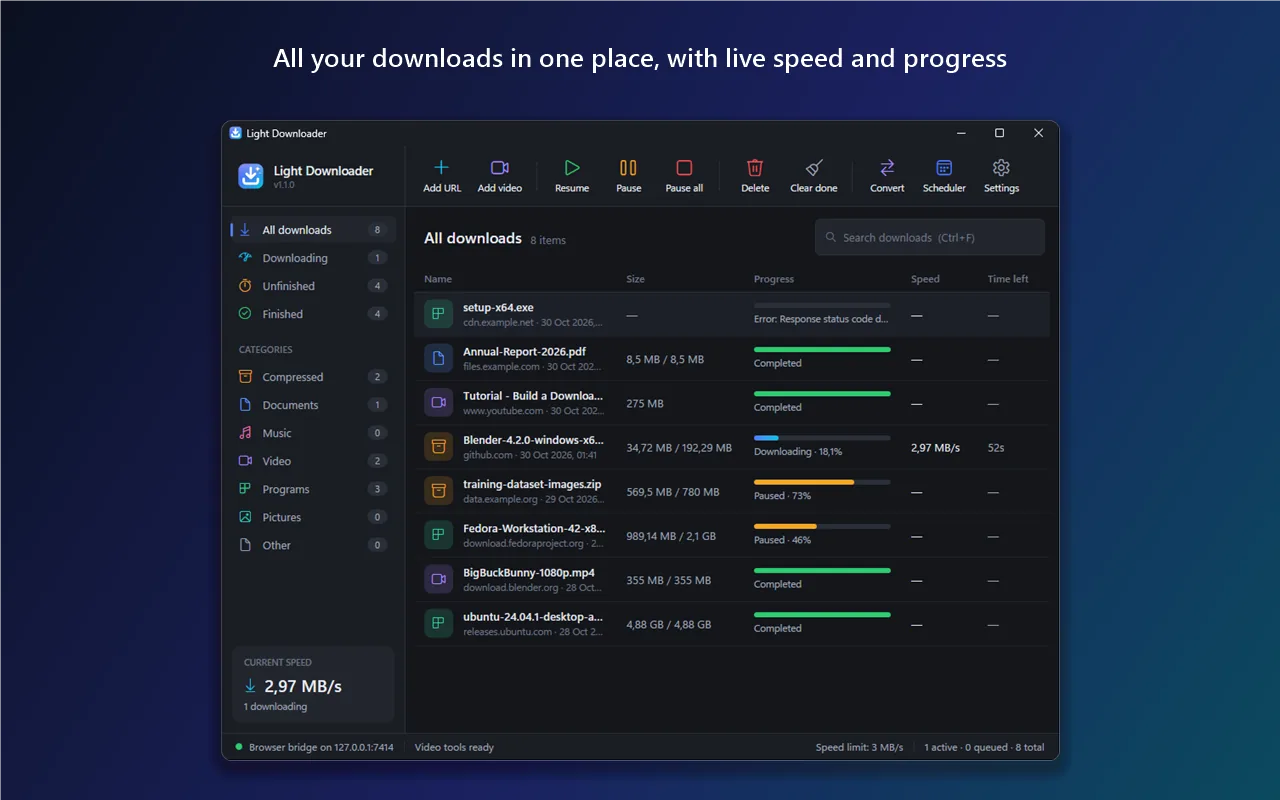
- Make sure the Light Downloader app is running (it keeps running in the system tray when you close its window). Its status bar shows Browser bridge on 127.0.0.1:7414 when the bridge is ready.
- Open the extension popup and check that automatic capture is turned on.
- If you changed the bridge port in the app's Settings, restart the app.
- Downloads started by programs other than the browser are not captured. Add them in the app with Add URL.
A file that needs a login fails
Make sure you are signed in to the site in the same browser, then start the download again. The extension passes that site's cookies to the app for the captured download.
Video download does not start
After installation the app downloads yt-dlp and ffmpeg in the background. Wait until the status bar shows that video tools are ready, and make sure you are connected to the internet.
Get help
Contact Beliaja.id support by email at order@beliaja.id or through the contact page. Please mention your browser and its version, the Light Downloader app version (shown under the app name, for example v1.1.0), and what happened.
Bahasa Indonesia
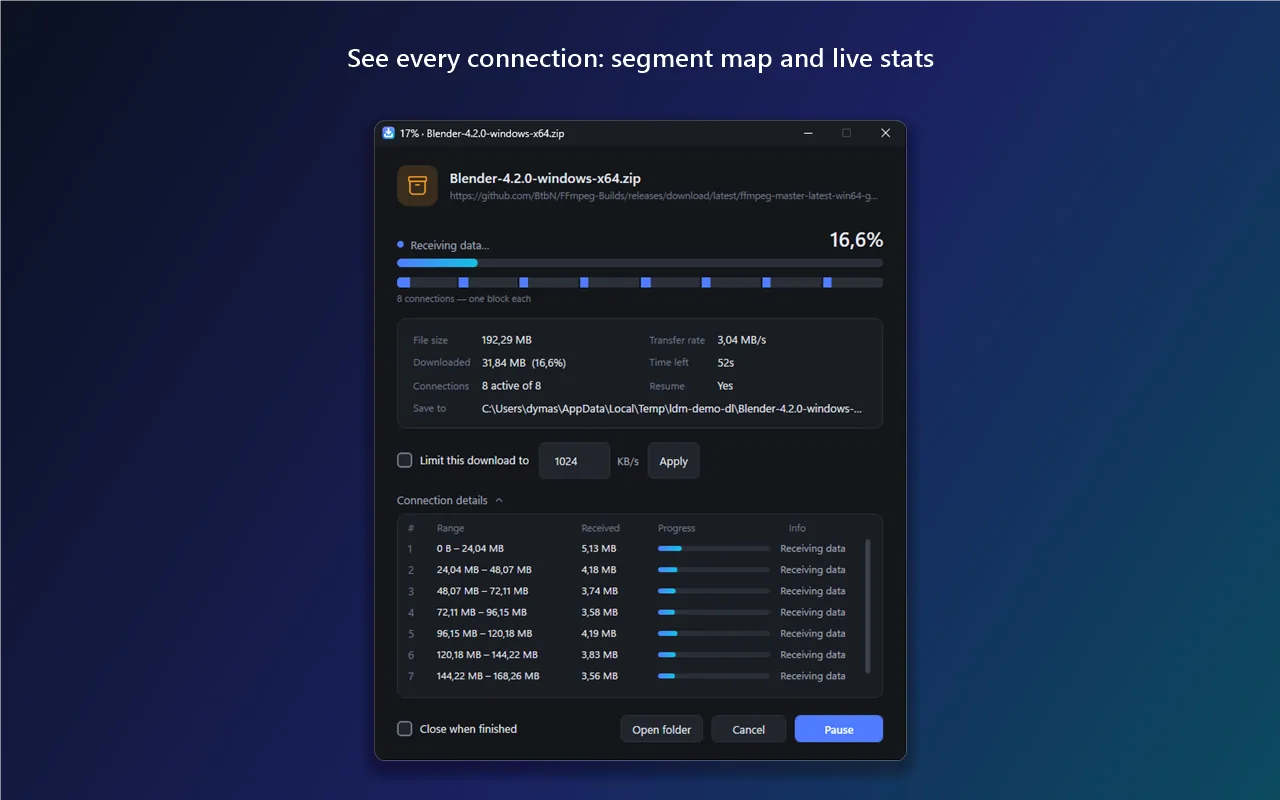
Ekstensi Light Downloader Integration menyerahkan unduhan yang Anda mulai di Chrome atau Firefox ke aplikasi Light Downloader di Windows, supaya diunduh dengan beberapa koneksi sekaligus, bisa dijeda dan dilanjutkan, masuk antrean, dan bisa dibatasi kecepatannya.
Aplikasi desktopnya harus terpasang dan berjalan. Ekstensi hanya berkomunikasi dengan aplikasi Light Downloader di komputer Anda sendiri (http://127.0.0.1). Bila aplikasinya tidak berjalan, browser mengunduh seperti biasa.
Cara memasang
- Pasang aplikasi Light Downloader lalu jalankan.
- Listing di Chrome Web Store dan Firefox Add-ons sedang ditinjau dan segera hadir. Sementara itu, pasang manual:
- Chrome/Edge: unduh light-downloader-chrome.zip, ekstrak ke folder yang akan Anda simpan, buka
chrome://extensions, nyalakan Developer mode, klik Load unpacked, lalu pilih folder hasil ekstrak. - Firefox: unduh light-downloader-firefox.zip, buka
about:debugging#/runtime/this-firefox, klik Load Temporary Add-on…, lalu pilih berkas ZIP-nya (ataumanifest.jsonsetelah diekstrak). Pemasangan ini sementara dan hilang saat Firefox ditutup.
- Chrome/Edge: unduh light-downloader-chrome.zip, ekstrak ke folder yang akan Anda simpan, buka
Cara memakai
- Saat aplikasi berjalan, unduhan yang Anda mulai di browser otomatis diambil alih aplikasi. Penangkapan otomatis bisa dinyalakan atau dimatikan dari popup ekstensi.
- Klik kanan tautan, gambar, audio, atau video lalu pilih Download with Light Downloader. Klik kanan halaman lalu pilih Download video from this page.
Izin yang dipakai
downloads: mendeteksi unduhan yang Anda mulai dan membatalkan salinan browser supaya aplikasi yang mengambil alih.cookies: membaca cookie situs asal agar berkas yang butuh login tetap bisa diunduh.contextMenus: menambahkan menu klik kanan.storage: mengingat satu pengaturan, yaitu nyala/mati penangkapan otomatis.- Akses ke semua situs (
<all_urls>): membaca cookie situs asal unduhan dan terhubung ke aplikasi dihttp://127.0.0.1. Ekstensi tidak membaca atau mengubah isi halaman, tidak menyisipkan skrip, dan tidak melacak penjelajahan.
Rincian privasi ada di kebijakan privasi ekstensi.
Butuh bantuan?
Hubungi kami lewat email order@beliaja.id atau halaman Kontak Beliaja.id. Sebutkan browser dan versinya, versi aplikasi Light Downloader, dan apa yang terjadi.